
You're halfway through a rebuild, the new CMS looks cleaner, and the developer says the old content will be “migrated across”. That phrase hides the part that determines whether organic search survives. A platform move can preserve every article while losing the URLs, internal links, canonicals and authority signals that made those articles visible in the first place.
Site migration services manage that transfer. The work starts with a crawl and a URL map, not a launch date, and it continues through post-launch monitoring. I'm Will, an SEO and website consultant, and I've worked on migrations for agencies and direct clients. My view is straightforward: copying files is relatively easy. Preserving discoverability, relevance and commercial performance is the actual job.
Table of Contents
- What Site Migration Services Actually Do
- Defining Site Migration Services in Plain English
- The End to End Migration Checklist
- Common Risks and How to Mitigate Them
- Pricing and Engagement Models Compared
- How to Choose the Right Migration Provider
- Pulling It All Together Before Launch
What Site Migration Services Actually Do
A mid-sized agency once handed over a CMS rebuild with confidence. The templates were faster, the content had been imported and the new navigation looked sensible. After launch, the team discovered that the rebuild had removed a large portion of the indexed URL set. The client saw the traffic drop and pointed at SEO, although the failure had happened inside the build process.
That's a common migration failure. A developer changes a slug, a content editor removes an old landing page, a JavaScript template stops exposing internal links, or a staging directive reaches production. No single decision looks catastrophic. Together, they break the path between Google, the old site and the new one.
Discover the site before anyone changes it
The first phase is discovery. I crawl the live site in Screaming Frog or Sitebulb, export indexable URLs, record titles and canonicals, and compare crawl data with Search Console landing pages and analytics. The sitemap is useful, but it isn't a complete record of how users and search engines find a site.
The deliverables should include a crawl baseline, an organic landing-page inventory, a backlink preservation list and a content or template inventory. For larger websites, Botify can help join crawl, log and search data, although the tool doesn't replace judgement about which pages deserve a destination.
Map authority, don't just map files
The second phase is mapping. Each valuable legacy URL needs a relevant destination, normally through a server-side 301 redirect. Pattern rules can help with predictable structures, but “all old product pages go to the category page” is often too crude. It can discard search intent and send users somewhere that doesn't answer the original query.
The mapping sheet becomes the central migration document. It should show the old URL, proposed new URL, status, redirect type, reason for removal and QA result. This is the practical foundation of future-proofing your digital ecosystem, because it connects technical change with the information architecture that follows.
Build and verify in separate gates
The build phase covers redirects in .htaccess, Nginx or CDN edge configurations, internal-link rewrites, canonicals, XML sitemaps, robots.txt and structured data. The staging site needs comparison against the live baseline, not just a visual sign-off.
The final phase is verification. I recrawl the new site, test redirect samples, inspect Search Console and review server logs for requests to missing or unexpectedly redirected URLs. Google's technical SEO guidance on website migration is useful background, but practical delivery still depends on a provider owning the evidence at every gate.
Defining Site Migration Services in Plain English
Site migration services are the planned, technical work involved in moving a website between platforms, domains, designs or URL structures while protecting organic search performance. The provider coordinates SEO, development, content and analytics so the new site retains the useful signals attached to the old one.
That definition matters because “migration” can mean several different projects. A WordPress rebuild may preserve the domain but change templates and slugs. A Shopify move may alter product paths and collection structures. A domain consolidation changes the property itself. A React or Next.js rebuild may introduce rendering, routing and crawl-path issues that weren't present in the previous CMS.
What normally sits inside the scope
A properly written brief should cover:
- Technical audit: Crawl the live site with Screaming Frog, DeepCrawl, Sitebulb or an equivalent tool, then reconcile the findings with Google Search Console.
- URL mapping: Create one-to-one redirects for important pages and pattern-based rules only where the old and new structures correspond.
- Content decisions: Review pages for preservation, consolidation, improvement or removal. A migration shouldn't carry every weak page forward automatically.
- Signal preservation: Retain structured data, metadata, canonicals, hreflang where relevant, pagination logic and meaningful internal links.
- Launch controls: Reconfigure robots.txt, XML sitemaps and analytics, then define who checks errors and indexation after release.
- Reporting: Give stakeholders a clear record of what changed, what was tested and what remains open.
A useful companion for technical teams is this migrating applications guide, particularly when the website move sits alongside a wider application or systems change.
What usually stays outside
Brand strategy, new copywriting, paid media and conversion-rate optimisation may be important, but they aren't automatically migration work. A provider can coordinate them, yet the contract should identify separate deliverables. Otherwise, a redirect budget gets squeezed by design revisions or content production.
The buyer should be able to paste the definition into a brief and ask a provider to confirm each item. If the answer is “we handle redirects at template level”, ask whether actual organic landing pages will be mapped individually. If there's no named crawl tool, no Search Console owner and no post-launch process, the scope is incomplete.
The End to End Migration Checklist
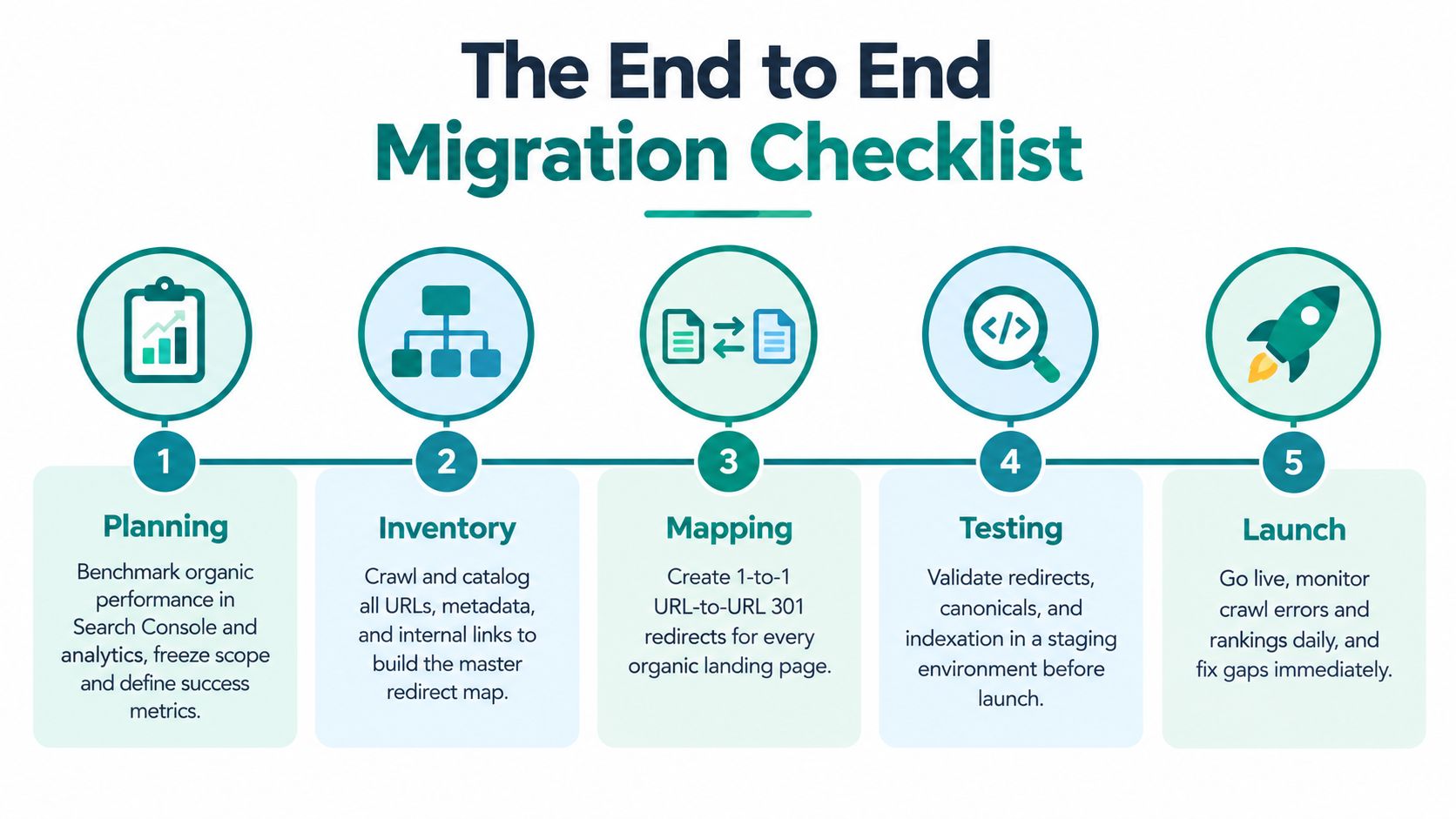
A migration fails when teams treat launch as the finish line. I use a sequence that starts with authority and URL evidence, then carries testing and monitoring into the weeks after release. Each stage needs an owner, a record of what was checked and a clear decision about whether the site is ready.
Planning
Benchmark organic performance in Search Console and analytics before development changes the evidence. Record pages receiving impressions, clicks, sessions, leads or sales, then agree which signals the new site must preserve.
Freeze the scope and create a no-go list. Include unfinished templates, unapproved content removals, untested URL patterns and release dependencies without an owner. A migration may include a redesign, but launch week is the wrong time to add an uncontrolled redesign.
Inventory
Crawl the live site and export indexable URLs, status codes, titles, descriptions, canonicals, headings, structured data, internal links and pagination signals. Combine that file with Search Console landing pages, analytics landing pages and backlink data from Ahrefs or another link index.
Mark URLs that are absent from the sitemap but still attract organic visits or links. Flag faceted navigation, filtered URLs, internal search results, attachments and thin archive pages. These areas commonly create duplicate or crawlable URL sets after a platform change.
Mapping
Create the master redirect sheet before development finishes. Use one-to-one mappings where a meaningful equivalent exists, pattern rules for consistently structured URLs and an explicit outcome for every removed URL.
A retired page may need a 410 response, a relevant replacement or no redirect. Sending every old URL to the homepage gives users a poor destination and makes fault-finding harder. Google recommends preparing the new site, creating a URL map, implementing server-side redirects and submitting the new sitemap in Search Console. Google's site move documentation describes that sequence.
Build and test
Implement redirects in the appropriate server or edge layer. Rewrite internal links so the new site points directly to final URLs, then update canonicals, XML sitemaps, robots.txt and hreflang where regional or language variants are in use.
Compare staging with the live crawl. Test trailing slashes, case changes, query parameters, pagination, old image paths and unusual characters. Keep redirect chains short. UK practitioner guidance commonly recommends one or two hops, with three treated as a practical ceiling, because each extra hop adds crawling and signal-transfer risk. This UK migration guide covers the issue in operational terms.
Practical rule: A redirect that works in a browser is not proof that crawlers receive the intended response.
Launch and monitor
Launch in a lower-risk traffic window, then check errors frequently during the first 48 hours. Submit the new sitemap, review server logs and keep the old domain available for the agreed retention period. For a domain move, Google recommends maintaining redirects for at least 180 days, while the old property's Change of Address notification remains available in Search Console for 180 days. That window supports the transition, but it does not replace monitoring.
Review indexation, rankings, landing pages, conversions and crawl errors weekly for 12 weeks. Use this website migration SEO checklist to structure the review, and document any system change that could affect tracking, payments or lead handling before deciding whether to switch to system.
A visual overview can help non-technical stakeholders understand the work. It should sit beside, not replace, crawl comparisons, redirect tests and post-launch evidence.
Common Risks and How to Mitigate Them
A migration can appear healthy in the browser while losing authority. Compare crawls, inspect Search Console and check analytics together. Missing pages, weaker landing pages and falling conversions often show up there before revenue makes the problem obvious.
UK search behaviour reinforces the need for precise mapping. The UK's public migration data spans immigration, returns, asylum and transparency, with Home Office statistics dating back to 2013. Its release for the year ending June 2026 reported 136.8 million arrivals, and British nationals accounted for 57% of arrivals. That scale and structure reflect how UK audiences often search for specific, localised information rather than one broad page. The Home Office statistics summary provides the source context.
| Risk | Signal to Watch For | Mitigation |
|---|---|---|
| Redirect chains or loops | Screaming Frog or Sitebulb reports multiple hops, loops or unexpected 302 responses | Map each old URL directly to its final destination and test rules at the server or edge layer |
| Template link loss | Crawl comparisons show fewer internal links to important pages, while Search Console landing pages weaken | Preserve navigation, contextual links and breadcrumbs, then crawl the rendered output |
| Index volatility | Search Console shows coverage changes, noindex findings, soft 404s or a sudden fall in indexed URLs | Check templates, canonicals, robots.txt and rendered HTML, then monitor the affected URL groups |
| Cannibalised destinations | Several old URLs point to one broad page, impressions fragment or revenue per session falls | Match redirects to search intent and consolidate only when the destination genuinely replaces the source |
| Domain consolidation failure | The old homepage or canonical pages do not 301 to corresponding new pages | Configure the domain move correctly and retain the old property for the agreed monitoring period |
A platform move, CMS rebuild or domain consolidation raises the risk because several systems change together. SISTRIX's UK IndexWatch 2025 analysis records substantial visibility losses across major UK domains, including brands that lost nearly all visibility in Google UK search. The analysis does not establish that migration caused every loss, but it shows why ranking changes require investigation rather than a quick launch-day check.
The authority-transfer work continues after release. Templates can alter internal linking, canonicals and page intent even when redirects pass their tests. Teams handling SEO migration services should therefore track URL groups, not only the homepage or a handful of priority terms.
I pay particular attention when a site's templates change after launch. The ONS has described its website as gradually redesigned, while its population and migration update shows how public information systems continue to change. The ONS website update illustrates why timing and measurement need context. Daily Search Console checks immediately after release, followed by sustained review, catch problems that a launch checklist cannot.
Pricing and Engagement Models Compared
There isn't a responsible universal price for site migration services. The work depends on URL volume, platform complexity, content condition, template count, domain changes, international targeting and how much post-launch ownership the provider accepts.
Some providers sell a fixed project. That can work when the crawl, mapping rules, platform and launch process are understood. It gives the buyer a defined deliverable and gives the provider accountability, but a low fixed fee can hide a thin redirect exercise. If the proposal only includes template-level rules, the buyer may be paying for speed rather than authority preservation.
| Model | Best For | Buyer Risk |
|---|---|---|
| Fixed-scope project | A defined platform move with agreed templates and URL inventory | Important exceptions get treated as change requests |
| Day rate or hourly consultancy | Internal teams with developers who need senior SEO decisions | The total cost can expand if discovery is weak |
| Ongoing retainer | Organisations needing continued monitoring, content and technical support | The migration may become buried inside general SEO activity |
| Hybrid engagement | A build phase followed by defined aftercare and reporting | Responsibilities can become unclear between launch and support |
Day-rate work buys flexibility. It's sensible where the provider must investigate an unfamiliar CMS, work directly with developers or arbitrate between stakeholders. The trade-off is that the buyer needs internal ownership and fast decisions, otherwise paid time disappears into coordination.
A retainer makes sense when the new site needs continuing technical SEO, content structure and measurement after release. It should still contain explicit migration deliverables, including crawl comparisons, redirect reviews and indexation reporting.
I'm wary of revenue-share arrangements unless both sides can define protected or recovered revenue without ambiguity. Attribution is affected by seasonality, tracking changes, brand demand and wider search volatility. A hybrid model is usually cleaner when it combines a defined implementation fee with a separately agreed monitoring period.
Ask for cost drivers, not a generic package. The provider should explain how the URL inventory, redirect depth, platform constraints, content decisions and stakeholder load affect the work. That tells you whether the quote reflects the migration in front of you or a reusable checklist.
How to Choose the Right Migration Provider
The right provider can explain what they'll inspect before they explain what they'll build. Ask to see the proposed discovery process, the fields in the redirect sheet and the way SEO, development and content decisions will be coordinated.
A credible practitioner will name tools such as Screaming Frog, Sitebulb, Botify, Ahrefs and Google Search Console, but tools alone don't prove competence. Ask what each tool contributes. A crawl identifies technical relationships, Search Console shows Google's view of the property, analytics shows user behaviour and backlinks help identify authority that a sitemap won't reveal.
Questions that expose practical experience
- Mapping depth: Will organic landing pages and linked URLs be mapped individually, or will the provider rely only on templates?
- Ownership: Who writes the redirect rules, who deploys them and who approves exceptions?
- QA evidence: Will you receive a staging crawl, redirect test results and a record of unresolved issues?
- Monitoring: Who reviews Search Console, logs, analytics and indexation after launch?
- Reporting: How will a drop in indexed pages, clicks or revenue per session be explained in plain English?
- Rollback: What can be reversed, by whom and under which conditions?
Green flags include a separately scoped discovery phase, a sample redirect sheet shared under NDA and a willingness to challenge the proposed URL structure. Good providers also ask for access to the live property before committing to a confident delivery estimate.
Red flags are easier to spot. A launch-day promise without a monitoring plan is weak. So is a proposal that talks about “redirecting the site” without identifying old organic landing pages. If the provider can't describe how they'll distinguish a crawl issue from a demand change, you won't get useful answers when performance moves.
Sibley Digital is one option for organisations that need crawl inventory, baseline assessment, URL mapping, redirect QA and launch monitoring alongside SEO and website implementation. Whether you choose an independent consultant, an agency or an internal team, use the same test: ask for a recent redirect sheet, confirm who owns the post-launch Search Console review and request an example of how indexation loss would be reported to a client without jargon.
Pulling It All Together Before Launch
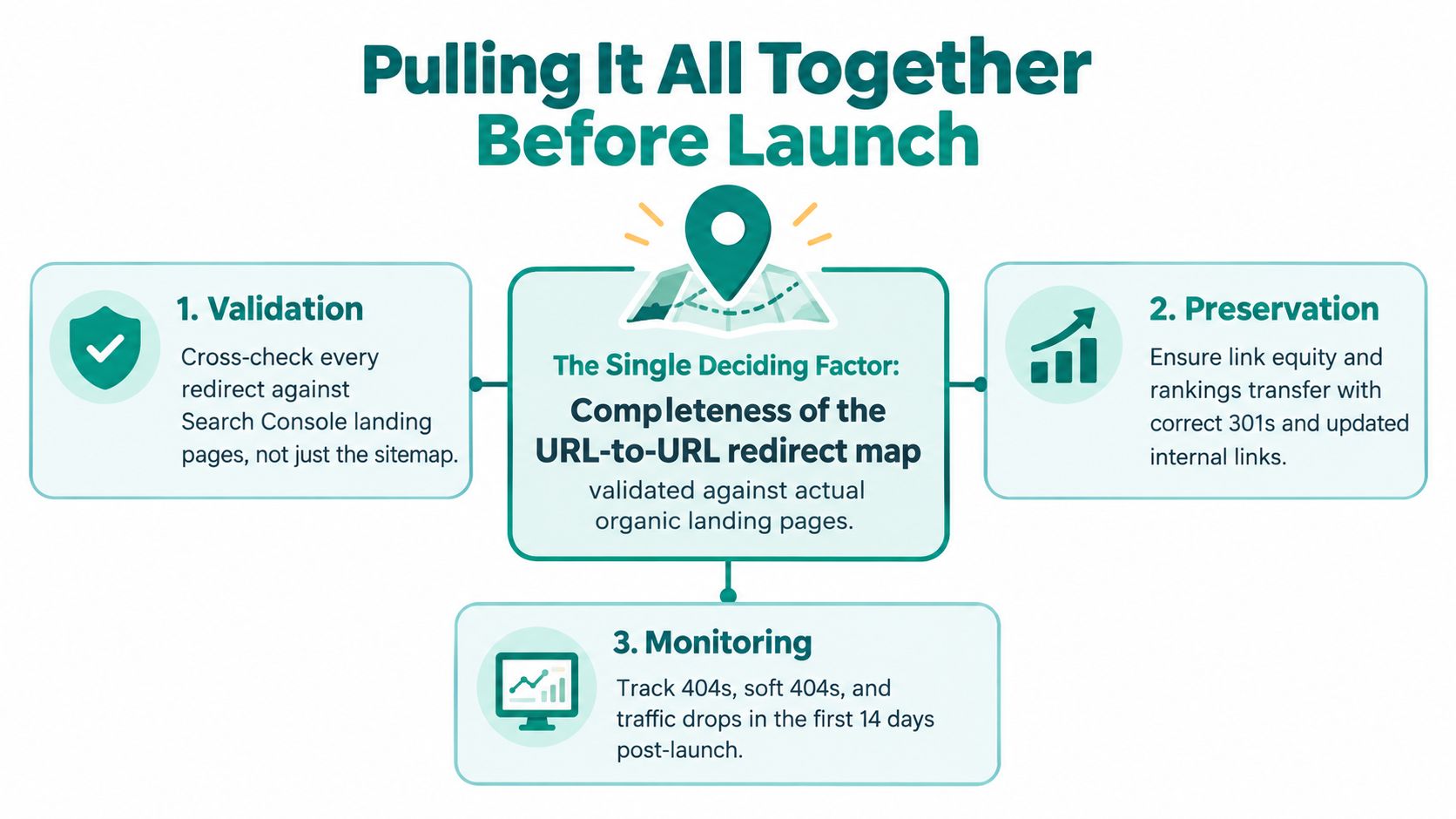
The decision that most often determines whether rankings hold is the completeness of the URL-to-URL redirect map, validated against real organic landing pages rather than the sitemap alone. If a valuable old URL has no relevant destination, a polished redesign won't restore the lost relationship automatically.
Before launch, I want three checkpoints cleared:
- Validation: Complete a redirect QA sample of at least 200 URLs, including high-value landing pages and awkward edge cases.
- Preservation: Verify the new Search Console property, internal links, canonicals, structured data and sitemap submission.
- Monitoring: Document the rollback path and tie it to a specific date window, named owner and tested release process.
UK migration history offers a useful parallel. ONS data has developed from broad summaries into detailed geographic and flow tables, including council-area datasets, while its provisional estimate for total long-term immigration in the year ending June 2025 was 898,000, down 401,000 from the updated year ending June 2024 estimate of 1,299,000. The ONS long-term migration bulletin illustrates why preserving detail matters. A site migration that collapses useful local pages into broad categories can lose search relevance even when every page technically loads.
Treat the first 90 days as part of the deliverable, not optional aftercare. Put monitoring time in the calendar before development starts, because the engagements that recover fastest are planned as a six-month project from day one, not a launch task that ends when the new homepage appears.
If you're planning a WordPress, Shopify or React rebuild, Sibley Digital can support the crawl baseline, URL mapping, redirect QA and post-launch monitoring that protect organic performance. Get in touch before the build starts, so the migration controls are part of the project rather than an emergency response after launch.