
Most sites don't need more internal links, they need better ones. A UK-focused dataset covering 23 million internal links across 1,800 websites and 520,000 URLs found that pages with 40–44 internal links averaged 8 Google Search clicks, while pages with 0–4 internal links averaged 2 clicks, a 4× difference in visibility, and it also showed performance tailing off after roughly 45–50 links per page rather than improving forever, according to Whitehat's website architecture SEO analysis.
That's why internal linking in SEO isn't a box-ticking task. It's an operational system. You use it to decide which pages search engines discover quickly, which pages they revisit, and which URLs on your site get treated as important.
I've spent the last ten years working on audits, rebuilds and migrations, and the pattern is consistent. Rankings move when internal links support business priorities, sit in the right parts of the page, and survive the way the site is built. They don't move because someone forced an arbitrary rule like “five links per post”.
Table of Contents
- What Internal Linking in SEO Actually Does for Rankings
- How Search Engines Discover and Value Your Pages
- Site Architecture That Makes Internal Linking Work
- Anchor Text and Link Placement That Earns Relevance
- Technical Realities That Break Internal Linking
- How to Audit and Measure Internal Linking Properly
- Putting Internal Linking into Practice on WordPress Shopify and Next.js
What Internal Linking in SEO Actually Does for Rankings
Internal linking in SEO helps rankings by doing three jobs at once. It helps search engines find pages, prioritise pages, and understand the relationship between pages.
That sounds simple, but most websites still get it wrong. They either rely on main navigation alone, or they scatter links randomly through blog posts without deciding which URLs deserve more prominence.
It's a discovery and priority system
Search engines move through your site by following links. If a page has weak internal support, sits several clicks deep, or only appears through filtered navigation, it's less likely to be crawled efficiently and less likely to be treated as a priority.
Internal links also signal intent. If several relevant pages point to one category, service page or guide using descriptive anchor text, you're making the topic and purpose of that destination clearer.
A practical SEO internal linking strategy usually works best when it starts with page importance, not with blanket content quotas. That's the difference between internal linking that shifts rankings and internal linking that just makes a site look busy.
Internal links aren't the same as backlinks
External links still matter because they bring authority into the domain. Internal links decide how you distribute that authority once it's there.
I treat internal linking as site plumbing. If your strongest pages never pass relevance and crawl attention to the URLs that drive leads, sales or enquiries, you're wasting what the rest of the site has already earned.
Practical rule: Internal links can amplify strong pages and rescue underlinked ones, but they won't fix thin content, indexation problems or a poor offer.
What internal linking can and can't fix
It can help a good page get discovered faster, surfaced more clearly and supported by related content. It can reduce structural waste when useful pages are buried, orphaned or over-reliant on sitewide navigation.
It can't compensate for a page that doesn't satisfy search intent. It also can't fix technical problems that stop Google seeing the links in the first place.
That's why I don't treat internal linking as a content-side tweak. I treat it as part of rankings infrastructure, tied to site architecture, crawl behaviour and commercial value.
How Search Engines Discover and Value Your Pages
Think of a website as a road network. Internal links are the roads, crawl paths are the routes, and your most important pages should sit on major junctions rather than at the end of forgotten lanes.
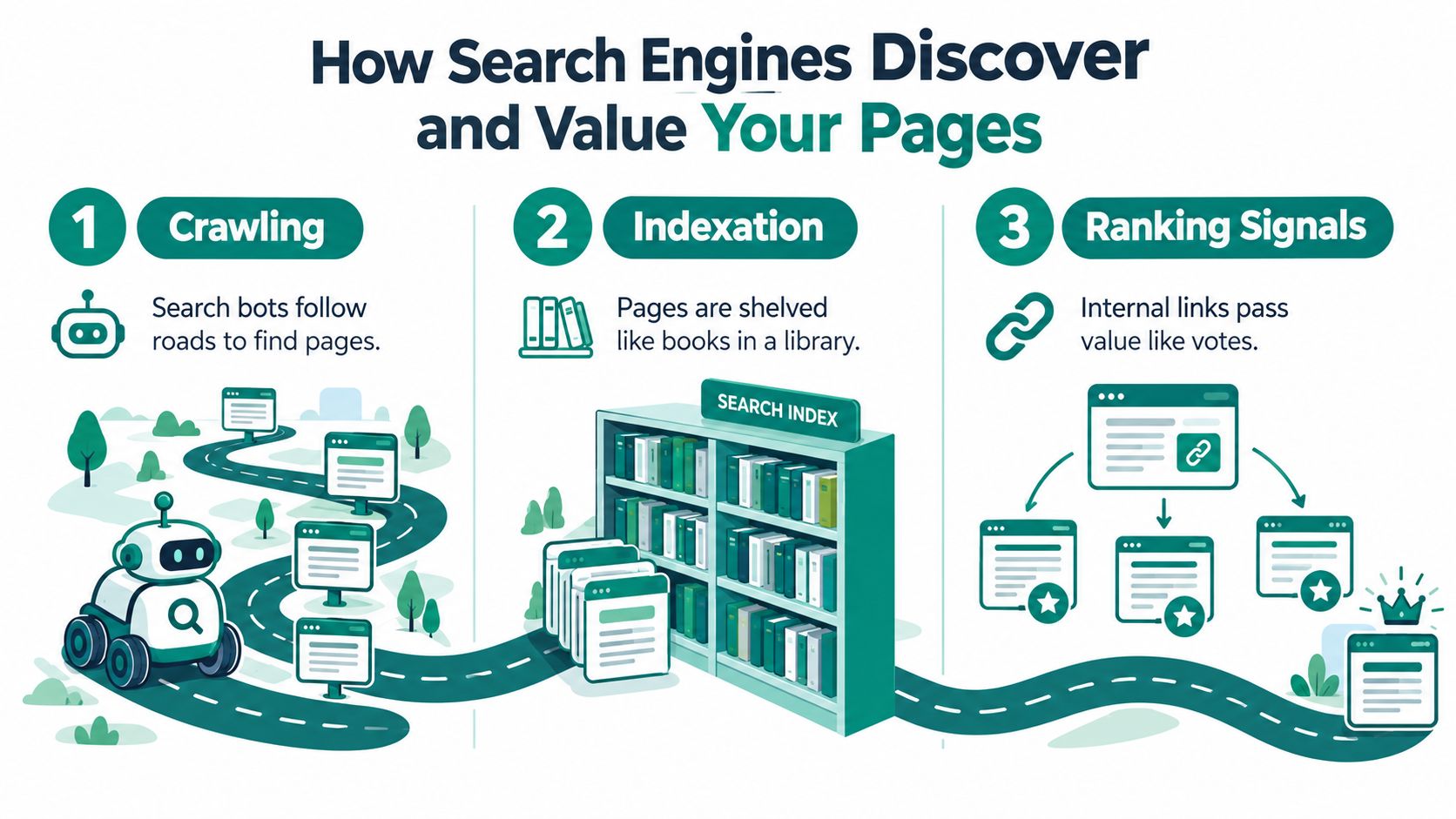
When Google reaches your site, it follows links to discover URLs, then decides which pages are worth indexing and revisiting. If the structure is clear, that process is straightforward. If the structure is messy, buried or inconsistent, important pages compete with junk.
Crawl depth tells you who gets neglected
In technical SEO practice, crawl depth means the number of clicks from the start page. Screaming Frog's UK documentation uses crawl depth along with Unique Inlinks, Outlinks and Link Score to spot pages that are buried or underlinked in the site structure, as shown in the SEO Spider tabs guide.
A page at high depth isn't automatically bad. Plenty of archive and long-tail pages can sit deeper without causing a problem. The issue starts when your revenue pages, key category pages or core guides are structurally distant.
Here's the basic mental model I use:
- Low depth pages tend to be easier to discover and revisit
- Pages with more relevant inlinks usually look more important internally
- Pages linked from strong, frequently crawled URLs tend to get better structural support
Context matters more than menus alone
Navigation links help establish hierarchy, but they aren't enough on their own. A menu can tell Google that a section exists. A contextual link inside a relevant article, category intro or help page tells Google why that destination matters in context.
Internal linking starts acting less like housekeeping and more like editorial judgement. You're choosing which pages deserve reinforcement from pages that already have visibility, links or crawl demand.
To make the process easier to visualise, this short explainer is worth watching:
Pages don't gain internal value because they exist. They gain it because the rest of the site keeps pointing search engines back to them with a clear reason.
Indexation follows structure more often than people think
Teams often talk about indexing as if it's separate from internal linking. In practice, the two are closely tied. If a page is difficult to reach, lightly linked, or only exposed through faceted states, it often struggles to become part of the pages Google treats as worth revisiting regularly.
That's why I look at internal links as instructions. They don't guarantee rankings, but they absolutely shape what search engines spend time on.
Site Architecture That Makes Internal Linking Work
Internal links work best when the architecture gives them something coherent to work with. If the site structure is chaotic, every extra link becomes a patch, not a solution.
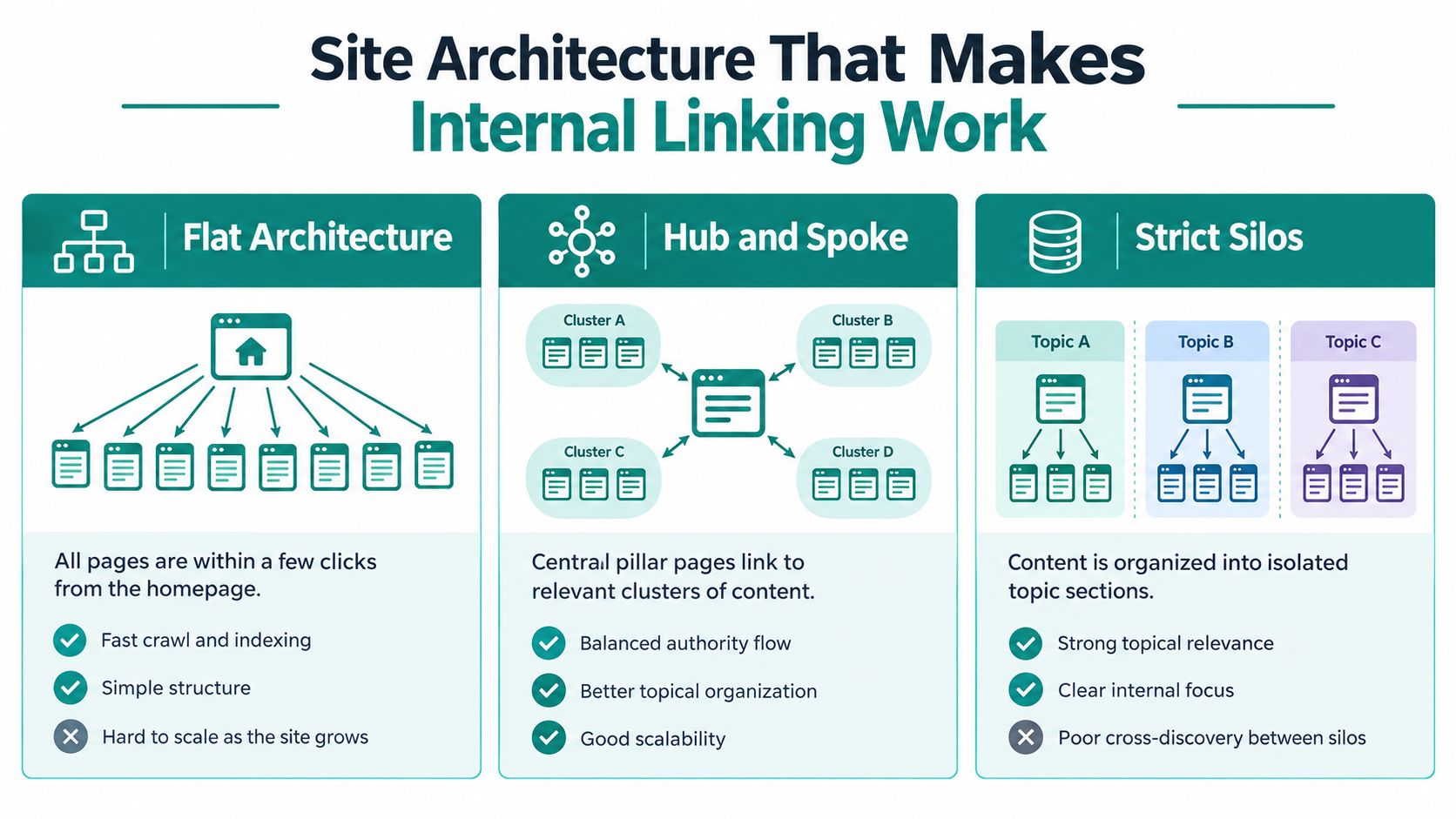
A UK technical SEO guide states that no link-earning page should be more than three clicks from the homepage because crawl frequency drops sharply at four clicks deep, and that wider UK practice treats pages beyond three clicks as at risk, according to Link Building Journal's technical SEO link building guide. That's a useful rule of thumb, especially for priority URLs.
Flat architecture works, until it doesn't
A flat structure tries to keep lots of pages close to the homepage. That can improve crawl efficiency and reduce buried content on smaller sites.
The problem is scale. Once the catalogue, service set or content library grows, flat sites become noisy. Too many pages compete for the same structural prominence, and users lose the sense of hierarchy.
Hub and spoke is usually the practical middle ground
For most service businesses, publishers and ecommerce brands, hub and spoke is the pattern I come back to most. You create strong hub pages, usually categories, parent services or pillar guides, and use them to organise related supporting pages.
This gives you cleaner topical grouping and better linking routes. It also gives editors and merchandisers a repeatable system for adding links without inventing a new logic every time.
Working view: If a page is commercially important, it should have more than one route leading to it, not just a slot in the menu.
Strict silos can create blind spots
Strict silos keep topics tightly separated. That can sharpen topical relevance, but it can also make cross-discovery worse if related sections never link to each other.
I see this on larger content sites where every section is neatly organised, yet useful links between adjacent topics are missing because the site is following taxonomy too rigidly. Users don't think in silos, and neither should your best linking opportunities.
Choosing an architecture pattern for internal linking
| Architecture Pattern | Best For | Internal Linking Implication |
|---|---|---|
| Flat architecture | Small brochure sites, compact service sites | Keeps priority pages close, but can become cluttered as the site grows |
| Hub and spoke | Most content-led, service and ecommerce sites | Gives clear hubs for authority flow and contextual links to supporting pages |
| Strict silos | Large sites with tightly separated topics or departments | Can reinforce relevance within sections, but often limits useful cross-links |
Orphan pages deserve special attention here. If a page has no meaningful internal path from the rest of the site, architecture has already failed before anchor text even enters the discussion.
Anchor Text and Link Placement That Earns Relevance
Once the structure is sound, the next question is where links sit and what the anchor text says. Internal linking in SEO stops being theoretical and becomes page-level craft.
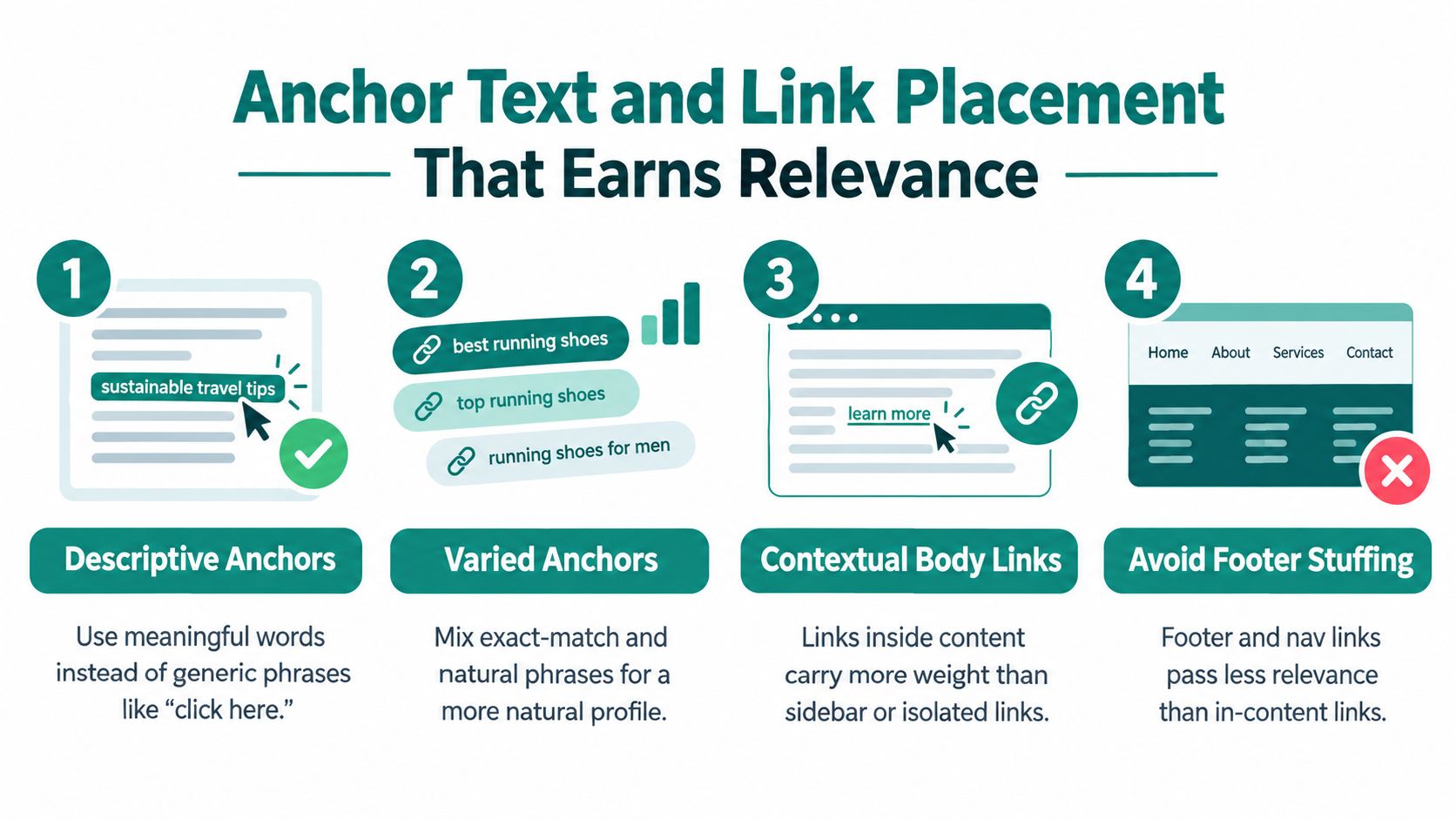
A Whitehat analysis referenced in a UK context found that pages with at least one exact-match anchor-text internal link had 5× more traffic than pages without such links, and the same website architecture analysis also reported that performance started to decline after roughly 45–50 internal links per page, which points to an optimum rather than a “more is better” model in Whitehat's internal linking research summary.
Descriptive beats vague
“Click here” tells search engines almost nothing. “Shop oak dining tables” or “technical SEO migration checklist” tells them much more.
That doesn't mean every anchor should be an exact match. It means your anchors should describe the destination in natural language. I want variety, but I also want clear signals.
Contextual body links usually carry the real weight
Footer links and repeated navigation links have their place. They help coverage and consistency. But when I need to support a page properly, I usually want a contextual link inside copy that already discusses the topic.
That could be a blog post linking to a category page, a buying guide linking to a product type, or a service page linking to a related implementation detail. For ecommerce teams trying to improve product page performance and rankings, this often matters more than endlessly tweaking isolated product copy.
Link according to business value, not word count
I don't use formulas like “two to five links per thousand words”. The better question is which pages deserve reinforcement.
A simple way to prioritise is this:
- Commercial pages first: Core service, category and product pages should receive links from relevant informational and navigational pages.
- Pages with existing demand next: If Search Console shows impressions but weak traction, stronger internal support can help them compete.
- Editorial support after that: Useful guides should link into conversion pages, but they should also receive links when they deserve to rank in their own right.
The right number of internal links on a page is the number that helps users and reinforces priority URLs without diluting the page.
Avoid over-optimisation and dilution
I see two common mistakes. One is stuffing exact-match anchors into every paragraph. The other is linking every mention of a topic to a different URL until the page loses focus.
Use anchors that fit the sentence. Place links where a user would reasonably want the next step. If a page is carrying a long list of unnecessary links, trim it. The evidence above is useful because it gives a boundary, not a quota.
Technical Realities That Break Internal Linking
A sound strategy can still fail in production. Internal linking breaks most often when the build, rendering setup or migration process gets in the way.

The biggest trap on modern sites is assuming that if users can see a link, Google can too. That isn't always true on JavaScript-heavy builds, especially after React or Next.js launches where key links are injected client-side or depend on interface states that crawlers may not reach consistently.
Rendering changes what search engines can actually follow
Recent guidance increasingly warns that critical internal links should be HTML-static rather than JavaScript-injected, and that rendered pages should be checked in Search Console to confirm the crawled version matches the visible version, as noted in this discussion of JavaScript-heavy internal linking risk.
That matters most for category links, related product modules, pagination, and key commercial pathways. If those links disappear unless the browser runs scripts in exactly the right order, your internal graph can weaken without anyone noticing.
Migrations often lose equity quietly
WordPress to headless. Shopify theme rebuilds. Monolith to Next.js. These are the projects where internal linking damage tends to slip through.
Templates change, breadcrumb logic changes, related content blocks vanish, and old contextual links get dropped during content import. The site goes live looking cleaner, but structurally weaker.
If you need the broader technical context, my guide on what technical SEO is covers the underlying crawl and indexation mechanics that sit behind these failures.
Orphans and buried URLs are usually symptoms, not isolated issues
Orphan pages rarely happen by accident on their own. They usually appear because the CMS workflow, faceted navigation, migration mapping or template logic doesn't support discoverability properly.
The same goes for high crawl depth. On paper, it looks like a page-level metric. In reality, it often reflects a deeper architecture problem or a rendering issue that strips out useful link paths.
If a key page only exists because a user can reach it through search or filtering, the internal linking system hasn't done its job.
How to Audit and Measure Internal Linking Properly
A proper audit starts with crawl data, then filters that through business value. I'm not interested in generic link counts on their own. I want to know which important pages are hard to find, underlinked, or supported by the wrong pages.
Pull the right fields first
In Screaming Frog, the fields I care about first are Crawl Depth, Unique Inlinks, Outlinks and Link Score. Those are the practical indicators for structural weakness in internal linking.
A straightforward audit flow looks like this:
- Crawl the site in Screaming Frog: Export URLs with Crawl Depth, Unique Inlinks, Outlinks and Link Score.
- Layer in Search Console data: Compare internal support against pages that already show impressions, pages that have dropped out, and pages that aren't being revisited often enough.
- Sort by business importance: Revenue pages, lead pages, high-value categories and core guides go to the top of the queue.
- Check orphans and weak pathways: If key URLs have poor internal support, find the nearest relevant pages that should be linking to them.
For a deeper process, I've written a practical guide to an internal linking audit.
What to fix first
I usually prioritise three groups.
First are pages that matter commercially and sit too deep. UK guidance from Screaming Frog practice treats pages at depth 4 or above as high-crawl-depth issues that should be flattened through architecture and internal linking, based on the SEO Spider tabs documentation.
Second are pages that already have external authority or strong visibility but don't pass enough value onward. These are your donor pages. They're often the best places to add contextual links.
Third are pages that are indexable and useful but barely connected. They may not need rewriting at all. They may just need better routes into them.
Measure movement with crawl and click signals
The Whitehat coverage of a large internal-link study says analysis of over 23 billion internal links found that pages with more internal links correlated strongly with stronger organic performance, and that descriptive anchors and internal-link volume remain key levers for discovery and relevance in Whitehat's internal links guide.
I still wouldn't measure success by “more links added”. I'd measure it by:
- Whether priority URLs moved closer to the start page
- Whether underlinked pages gained stronger contextual inlinks
- Whether Search Console starts showing healthier click and recrawl patterns for those URLs
That gives you a practical before-and-after view without pretending every site needs the same quota.
Putting Internal Linking into Practice on WordPress Shopify and Next.js
Strategy either survives contact with the CMS or falls apart.
WordPress needs template discipline
On WordPress, the easiest wins usually come from template-level decisions. Category intros, related posts, breadcrumb trails, parent-child page structures and manual links inside cornerstone content all help, if they're set up intentionally.
I also watch taxonomy sprawl closely. Too many thin tags and weak archive pages create noise rather than useful pathways. My WordPress and SEO guide goes further into how I handle that balance.
Shopify needs stronger routes from collections to products
On Shopify, internal linking often leans too heavily on collection grids and main navigation. That covers discovery, but it doesn't always add much context.
The stronger pattern is to support important products through collection copy, buying guides, FAQs and cross-links between related ranges. If a product matters commercially, it shouldn't depend only on being one tile in a grid.
Next.js needs links that exist before scripts do
With Next.js, I'm careful about what renders server-side or as stable HTML and what depends on client-side behaviour. Critical links need to survive no matter how the front end loads.
That includes category paths, breadcrumbs, related content modules and any links pointing at high-value commercial pages. During rebuilds, I map old internal routes to the new structure before launch so authority doesn't disappear with the old templates.
One practical note here. If you want outside help, keep it specific. For implementation work, that usually means a proper technical SEO, on-page SEO, link building or content marketing brief rather than a vague “SEO tidy-up”.
Internal linking works when three things stay aligned: crawlability, business value and what Google can render and index. That's the system I use, and it's the one that keeps working across WordPress, Shopify and modern JavaScript builds.
I help companies and agencies sort out exactly this kind of problem, from internal linking audits and site architecture fixes to rebuild planning on WordPress, Shopify and Next.js. If you want a senior pair of hands to tighten the structure and make sure your important pages get the support they need, visit Sibley Digital.